Dynamic Flow Map is a visualization tool that displays aggregated trace data in a map view. It focuses on a specific service (called the focal node) and reveals how performance changes in upstream and downstream services affect each other. By highlighting correlated anomalous latency and errors in traffic between services, the map helps you quickly identify performance bottlenecks and trace issues to their root cause. The map displays up to 3 hours of trace data.
Why it matters
Dynamic Flow Map reduces mean time to resolution by surfacing performance anomalies visually. Instead of manually analyzing traces to understand service relationships, you can see at a glance which services are experiencing issues and how those issues correlate with the focal node. The color-coded visualization shows you where latency or errors that are correlated with the focal entity's performance are occurring in your distributed system.
For general map navigation and interface controls shared across all New Relic maps, see Maps.
Important
Distributed tracing is required for the Dynamic Flow Map to work, and it is enabled by default for all APM agents. If data is not visible, ensure Distributed tracing is active for the focal node and associated entities, and verify that tracing data appears in New Relic.
Access the Dynamic Flow Map
You can access the Dynamic Flow Map from multiple locations in New Relic depending on your investigation needs:
From the Traces page
Use this option when you want to visualize and investigate trace relationships across your distributed system starting from a focal node.
Important
This access option is only available if you are using entity-scoped pricing model.
Use this option when you're exploring your service architecture from a map and want to see how performance changes in upstream and downstream services affect a specific entity, with trace-level anomaly detection.
On the map, point to any entity node.
From the context menu, click View dynamic flow (the traces icon).
From a specific transaction
Use this option when you need to troubleshoot performance issues for a specific transaction and want to see which services are involved and where latency or errors are occurring in that transaction's execution path.
When you access the Dynamic Flow Map through a specific transaction, the map displays only the entities involved in that transaction. Unlike the focal node-based dynamic flow map, this transaction-specific view does not include the performance by transactions table, as it is already focused on a single transaction.
Go to one.newrelic.com > All capabilities > APM & Services > (select an app) > Transactions.
Select a specific transaction from the list.
The dynamic flow map loads automatically, showing only the services involved in that transaction.
From Transaction 360
The Dynamic Flow Map appears as a component within the Transaction 360 view of any transaction. The map displays the services participating in the transaction and the time taken by each service.
Conseil
In transaction-specific views, the performance by transactions table is not available because the view is already focused on a single transaction. However, when you navigate to other features from these views, the transaction filter is passed along so you can continue your focused analysis.
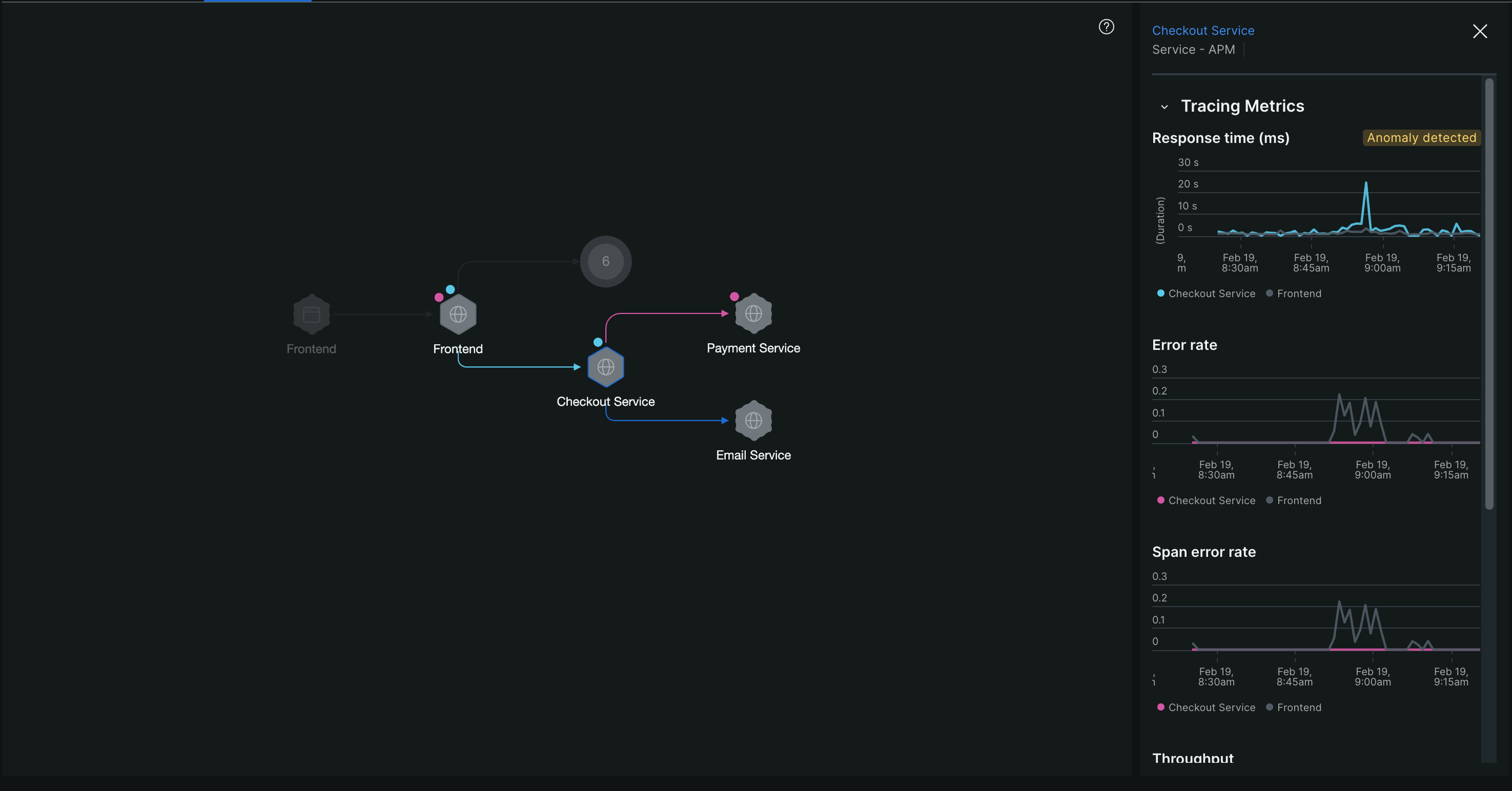
The Dynamic Flow Map shows relationships between the focal node (highlighted with a gray spotlight) and surrounding entities. Upstream services are represented with edges pointing towards the focal node, while downstream services have edges pointing away from it. You can interact with the map to view performance trends, anomalies, and other details as follows:
The map displays anomalies using color-coded edges and dots:
Edge colors (showing anomalous traffic between services):
Blue edge: Latency anomaly detected in traffic between the services.
Pink edge: Error anomaly detected in traffic between the services.
Blue and pink striped edge: Both latency and error anomalies detected in traffic between the services.
Dots beside nodes (showing anomalies within a service):
Blue dot: The service is experiencing latency anomalies.
Pink dot: The service is experiencing error anomalies.
Conseil
If you see a node with an anomaly dot but some connecting edges aren't color-coded, this is because anomalies are calculated independently for nodes and edges. For example, a latency anomaly might only occur along some of the call paths to that entity.
Filter anomalies by type
Use the interactive legend at the top of the map to focus on specific anomaly types:
Click Latency in the legend to show only latency anomalies (removes error indicators from view).
Click Errors in the legend to show only error anomalies (removes latency indicators from view).
This filtering helps you remove noise when you want to focus on one type of performance issue.
To keep your map organized, the map automatically groups entities with low anomaly scores into clusters. You can expand clusters to view individual entities as needed.
To view and manage entities within a cluster:
Click on a cluster node. A list of all entities in that cluster appears in the right panel.
To display an entity separately on the map, click its visibility icon in the right panel.
Use multi-select mode when you need to investigate traces that pass through specific entities in your service architecture. This helps you narrow down your analysis to understand how particular services interact within a trace path.
To filter by multiple entities:
Click the cursor icon in the top right corner to enter multi-select mode.
Click the entities you want to include. A sidebar tracks your selections.
Click Apply to redraw the map showing only traces that pass through both the focal node and your selected entities.
In multi-select mode:
You can select individual entities only. Clusters cannot be added.
The focal node always remains in the filter and cannot be removed.
Conseil
When filtering by multiple entities, you may get an empty map if those entities don't appear together in any trace. To avoid this, apply one entity filter at a time to incrementally narrow down the map.
When you need to investigate a specific service's performance and its relationship with the focal node, click any entity on the map to open a detailed sidebar.
The sidebar helps you:
Access related pages: Use header links to navigate to the entity's APM page or owning team page.
Analyze performance: Review time series charts showing tracing metrics for both the selected entity and focal node. Anomaly badges appear on charts when the entity has performance issues.
Investigate transactions: See which transactions involve the focal node and access detailed transaction information.
View traces: There are two View traces buttons with different filter contexts. The button on the main map opens the tracing homepage with all currently applied filters (entity filters, transaction filters, time range). The button in the sidebar opens the tracing homepage with all map filters of the currently selected entities.
Manage ownership: Assign entities to specific teams.
Manage tags: View and add tags to the selected entity.
The performance by transactions table displays time series data for each transaction associated with the focal node. Use this table when you want to focus the map on traces that include a specific transaction.
To filter by a specific transaction:
From the performance by transactions table at the bottom of the dynamic flow map, review the time series data for each transaction.
Click Generate map next to the transaction you want to analyze.
The map redraws showing only traces that include that transaction name.
The time picker lets you select a specific time range to analyze trace data. You can choose from preset time ranges (like last 30 minutes, last hour) or define a custom time range.
To adjust the time window:
Click the time picker at the top of the page.
Select a preset time range or set a custom start and end time.
The map updates to display trace data for the selected time range. If you select a time window longer than 3 hours, the map automatically uses the most recent 3 hours within that window.